My first robot car
First build
What it is: my first project, a WiFi robot car for the school's yearly expo, driven from a phone app.
Built with: NodeMCU (ESP8266) WiFi board, L298N motor driver, 4 BO gear motors, 3 Li-ion cells. Programmed in the Arduino IDE by following YouTube tutorials; driven with a phone app made by a YouTuber.
Read the full story
What I did:
- Started with no tools and no computer: just a phone. ArduinoDroid on the phone didn't work, so I revived an old laptop, got it online over USB tethering, installed the Arduino IDE and programmed the car.
- Went from kitchen knives to my first real tool, a screwdriver from a family friend that I still use.
- Learned about batteries the hard way: a 9 V battery couldn't run the motors. Learning about capacity and C rating, and moving to Li-ion cells, fixed it.
- The night before the expo the car was badly damaged. I rebuilt it overnight, and it worked at the expo.
What it taught me: how to keep going alone, how batteries really work, and that a project isn't finished until it works on the day.
Where it is now: its wheels and motors still sit on my shelf, a reminder of where it began.
Robo Sumo bot - ROBOTICA-25, Runner 2
Runner 2 · national
What it is: my first car, rebuilt from scratch as a sumo robot - two robots in a ring, each trying to push the other out.
Result: Runner 2 (3rd place) in Robo Sumo at ROBOTICA-25, the 6th National Level Inter-School Robotics Competition (Otomatiks), VIT University, Chennai, 7-8 February 2025.
Read the full story
Built with: a metal chassis, gear motors, an L298N motor driver, a NodeMCU (ESP8266) WiFi board and Li-ion cells. Driven over WiFi from the same phone app as my first car.
Programming: my own code didn't work in time, so my teacher gave me a pre-programmed NodeMCU. I built, wired and drove everything else.
What I did:
- Rebuilt the car from scratch for a national competition, and switched events (Robo Race to Robo Sumo) when the plan changed.
- Learned why gear motors beat the small BO motors in sumo: a gear motor trades speed for turning force (torque), and sumo is won by pushing, not by speed.
- Kept building through cut fingers and parts that wouldn't work, and turned down the offer of a ready-made robot so I could compete with my own.
Thanks: my Class 6 teacher, for the gear-motor advice, and my grandfather, for helping me get the parts.
GPS Guardian - a GPS safety wearable for children
National round
Team: Sentinel Innovators.
What it is: a wearable that lets parents know where their child is and alerts them when the child leaves a safe area.
Read the full story
How it started (Class 6, between the school expo in Oct 2024 and ROBOTICA-25 in Feb 2025):
- The idea proposals. My first two ideas weren't approved: a Mars rover that finds water (I already had the parts) and a device that uses electrical signals to curb cravings. The second was reshaped into a wearable that gives a shock when a prisoner leaves a boundary.
- My design: two ESP boards talking over ESP-NOW - a watch and an alarm unit - working out the distance between them.
- My teacher's change: a NEO-6M GPS for the position and a SIM800L GSM module to send text messages.
- The new focus: while I built it, it became child safety - parents keeping track of their child - with no shock.
- The video. The night before filming I had a fever, and I kept the GPS out on the open terrace for about eight hours, trying to get it to find the satellites. By morning it still hadn't, so we filmed the demo without it working.
Built with: an ESP32, a NEO-6M GPS module, a SIM800L GSM module for the messages, and two Li-ion cells.
As built: not a watch yet - every part was mounted on a blue board as a working prototype, with an LCD screen to show what it was doing.
What happened: the GPS never got a position fix and the GSM module never sent a message before the deadline.
What I worked out later: the SIM800L's light never came on at all. It was wired to the ESP32's "5 V" pin, which on battery power passes straight through the full ~8 V of two Li-ion cells - nearly double the module's 4.4 V limit. It most likely never ran, or was damaged at once. It needed its own regulated supply.
What it taught me: the hardest parts of a project are often the ones you can't see, like satellites, mobile networks and power. Now I test every module on its own first, read what its status light is saying, and give each part the power it actually needs. These are the habits that made my later projects work.
The competition (Class 7, 2025): our video got GPS Guardian selected (July 2025), and it went all the way to Round 3 - the National Round of the STEAM Innovation League (STEMROBO), at Yamuna Sports Complex, New Delhi, on 2 August 2025 - a certificate and a shield. Teachers, seniors and friends helped me rebuild it; a replaced GSM module and every part worked, but the program did not run on the day, and the judging did not go well.
The trip home was on my birthday, 3 August - the day after the national round - and the journey made my teacher and me, as he put it, brothers.
What it taught me: a project is only ready when it has run from start to finish, many times, before the day - and know who your judge is before you start presenting. Every safeguard in my later work (self-tests, rehearsals, a backup link when the venue WiFi fails) comes from this day.
Laser audio link
Experiment
What it is: sending sound across the room on a beam of laser light instead of a wire.
Built with: two boxes. The sender has an AUX socket to plug in a phone, with the laser wired straight to it. The receiver has a solar panel, a transistor to strengthen the signal, and a speaker.
Read the full story
What happened: the signal was too weak to drive the speaker without a proper amplifier, so it became a light detector instead.
What it taught me: a weak signal has to be made stronger before it can drive anything - a lesson about signal paths I've used ever since. A calm, enjoyable experiment.
FPV boat
Never sailed
What it is: a boat driven by remote control while watching a live camera view from on board (FPV - first-person view). The project I put the most into that summer.
Read the full story
Built with: a 3S Li-ion battery, an L298N motor driver, two high-speed motors and an AI-Thinker ESP32-CAM for the live video. It started with a second ESP as the controller; I removed it once I learned the ESP32-CAM could do both jobs.
How it was laid out: like a raft with a clear roof - the camera at the front on a small mast, the battery in a cavity in the middle, the motor driver at the back, and two motors with propeller blades at the back, under the water.
What happened: it started as a group project and I built it myself. The motors sat under the water but weren't waterproof, so it never made it onto the water.
What it taught me: a big learning curve, especially programming the ESP32. Working with the ESP32-CAM here is what led straight to WiseBin.
WiseBin - a smart AI dustbin that sorts waste by itself
Certificate of Excellence
"WiseBin - even a bin can be wise." Fun fact: its first name was Dustina.
What it is: a dustbin that looks at what you throw away and opens the right compartment: e-waste, recyclable, non-recyclable or metal. It protects the sanitation workers who otherwise sort mixed garbage by hand.
Read the full story
How it grew: the first plan was TensorFlow Lite on an ESP32-CAM with 4 servos; the sorting mechanism became a servo that pulls each compartment's door open (simpler than a conveyor belt). The later version (v2, documented Nov 2025) runs YOLOv8 on a Raspberry Pi 4/5 with a USB camera: it recognises 31 kinds of object, maps them to 4 bins, opens the lid with a servo, works fully offline, and starts by itself at power-up.
What it taught me: design for what the AI can actually see - an "unknown" bin is useless if the AI has no "unknown" class; an AI that knows objects (a bottle, a banana) doesn't know materials (plastic or glass).
Watch: my 3½-minute explanation video of the 2026 WiseBin, on the web version of this portfolio.
Work on it paused while GPS Guardian went to the national round in Delhi (Aug 2025).
The Madurai competition (Aug 2025): the ESP32-CAM was too small for the AI, so I moved to a Raspberry Pi and learned YOLO from a senior. The entry video was made in a rush (a cardboard body, an under-powered Pi, servos run through an Arduino Uno), and it was selected for the next round. There, the link between the Raspberry Pi and the Arduino still wasn't working; I explained the design to the judges, who pointed out that it used a general pretrained model (COCO) rather than one trained on waste.
Teachers' Day (5 Sep 2025): I rebuilt it as a present for my teacher, working day and night: I removed the Arduino so the Raspberry Pi drives the servos directly, and it worked fully - put an item in the bowl, the AI identifies it, and one of the four doors opens. The last piece, a centre servo that pushes the item through the door, wasn't finished: the door spacing and opening mechanism needed a redesign.
What this part taught me: pack everything the night before (power supply, wires); use one controller where one is enough; and judges value an AI trained on your own problem over a general one. (I used a general model because my old PC had no graphics card to train one of my own - a limit I worked around later, in Wise Agri Growth.)
Kalam Award 2K25 (24 Oct 2025): WiseBin went to "A Mega Project Expo - Kalam Award 2K25" at SCAD College of Engineering & Technology, Tirunelveli - a Certificate of Excellence. A judge tested it with an item of her own choosing (scissors), and it didn't recognise it in the busy expo setting: the general AI model needed a clear close-up on a plain background and knew only a small list of objects. At the same expo I helped three classmates' projects - wiring an agricultural robot, troubleshooting and soldering a weather station, and choosing parts for and soldering a voting machine.
What this part taught me: test the AI the way a stranger will use it - their objects, their light, their background - not only the way it was built to be shown.
IDEA CONTEST 2025 - Francis Xavier Engineering College, Tirunelveli (7 Nov 2025): a state-level mega project contest for school students. WiseBin was shown again; with the camera held close to the item, the detection worked in front of the judges - a certificate of participation.
The school's yearly expo (2025): WiseBin was shown to parents at the school expo. The night before, I helped my teacher assemble seven robot cars in one hour for younger students - the same kind of car I built in Class 6.
Where WiseBin ended: it worked, but the AI was still slow and limited to the objects a general model knows. It taught me most of what I needed for my next project: a real computer for the AI, one controller instead of two, testing the way a stranger will use it, and finishing before the day.
The rebuild (Class 8, Aug 2026): WiseBin was selected for a competition in Madurai, so I rebuilt it properly - now with my own trained AI:
| Class 7 WiseBin | Class 8 WiseBin (v6) | |
|---|---|---|
| AI | a general object detector (YOLO, COCO) | my own classifier, trained on 13,629 waste photos, sorting by material |
| Accuracy | slow, often missed items | 96 % right bin on validation photos; with CLIP added, 4.2 % wrong bin on 1,400 test photos |
| Training | impossible on my old PC | 9 minutes on a laptop graphics card |
| Safety | - | waits if a hand is in the chute; motors stop if the control page goes quiet |
| Control | none | a live dashboard: video, the AI's verdict, temperature, bin fill, flame alarm, drive pad |
| Body | fixed bin | a mobile base: two geared motors and caster wheels |
Every upgrade, part by part (what worked, what didn't, and what I fixed):
| Part | What it does | Status |
|---|---|---|
| Raspberry Pi 4 (8 GB) - the school lab's | runs the AI and the dashboard (my own Pi's power chip had failed) | working |
| Arduino UNO, linked to the Pi by USB | drives the servos, motors and sensors; its 5 V pins take the ultrasonic sensors directly, with no resistor dividers | working |
| USB camera above the chute | sees each item; the AI wakes only when something new appears | working |
| 4 lid servos | open one bin's lid - now gliding instead of slamming, and one item gives exactly one opening | working |
| Centre sweeper servo | sweeps the item round to the open lid | fixed - it was my wiring (a dashboard switch bypassed it until then) |
| Hand check (AI) | if a hand is in the chute, the bin waits | working |
| Front ultrasonic sensor | emergency stop for the moving base | fitted and reading distance; the stop isn't switched on yet |
| 4 bin-fill ultrasonic sensors | show how full each bin is | fitted, but read nothing - most likely their shared trigger wire |
| Flame sensor (e-waste bin) | fire alarm that also stops the motors | fitted, then switched off - it fired on room light; needs aiming at the contents |
| Pi health monitor | CPU, memory, temperature and low-voltage warning on the dashboard | working |
| Mobile base | 2 geared motors, a motor driver and 2 caster wheels, driven from the dashboard | fixed - it couldn't move the full bin until I took off a rubber piece that was dragging |
| Deadman timer | the motors stop 0.8 s after the control page goes quiet | working |
| Power | a battery pack with two separate 5 V converters - one for the Pi, one for the servos | the servos never disturbed the Pi; the big YOLO model did, so on battery it runs the lighter AI |
Speed: the old code secretly enlarged every camera picture before the AI saw it - slower and blurrier; fixed. Looking for movement on a half-size picture cut that step from 28 to 7.9 milliseconds, the Pi's CPU load from 100 % to about 20 %, and its temperature from 53 to 41 °C. It starts by itself at power-on, and new kinds of waste can be added by writing one sentence for CLIP - no retraining.
Entered in a competition in Madurai (28-29 Aug 2026) with a video, a technical document and an audio pitch; its live round on 3 Sep was cancelled. Result: coming soon. The whole rebuild was done in 3-4 days after the selection. The code was written with an AI coding assistant under my design and testing.
Projects I helped build
Read the full story
| Where | Project (a classmate's) | What I did |
|---|---|---|
| TECHNO TALENTUM 2025, St. Joseph's Group of Institutions, OMR, Chennai (26 Jul 2025) - a talent test meant for Classes 11 and 12; I was in Class 7 | a fire-safety system: detects a fire, puts it out, and sends an SMS alert | chose the parts and did all the wiring |
| SCAD College, Kalam Award 2K25 (Oct 2025) | an agricultural robot | wired it |
| SCAD College, Kalam Award 2K25 | a weather station | troubleshooting and soldering |
| SCAD College, Kalam Award 2K25 | a fingerprint voting machine | chose the parts and soldered it |
| School, 2026 (Class 8) | a plastic-type finder that measures density by floating the object in water and salt water | suggested an ESP32 camera to measure how deep the object floats - for a solid piece, that gives its actual density (Archimedes), not just "floats or sinks" |
| School, 2026 (Class 8) | a smart water filter | the idea of a web page served from the ESP32 itself |
| School, 2026 (Class 8) | a machine that turns plastic bottles into 3D-printer filament (ESP32, 5 servos, heated blades, 4 motors, 3 sensors) | helped choose the components, fixed mistakes, and helped get its control program written |
A learning year
After WiseBin I stopped competing for a while and spent the time learning electronics properly, on my own. In the May 2026 holidays I built a set of bench projects, all hand-soldered on perfboard:
Read the full story
| Project | What it does | What I learned |
|---|---|---|
| Electricity-presence finder | senses mains electricity in a room, with transistors | how a tiny signal is amplified until it can light an LED |
| Line detector (live-wire finder) | tells how close you are to a hidden live wire | the same idea, tuned for distance |
| LED flasher | two LEDs blink one after the other, timed by a capacitor | how a charging capacitor sets the timing while two transistors keep switching each other |
| Logic gates from switches | four gates - AND, OR, NAND and NOR - built only from push-buttons and LEDs | logic is just wiring: switches in series make AND, in parallel make OR, and the same switches placed across the LED (shorting it out) turn them into NAND and NOR |
| Clap and loudness detector | a microphone picks up a clap; the LED glows brighter the louder the sound | a microphone's signal is tiny, so it has to be amplified before it can light anything |
| Continuity tester | two probe leads: the LED lights when they touch two ends of the same wire or joint | how to check a connection - the habit behind every repair I've done since |
| Practice boards | small boards just for soldering connectors, transistors, an LED, a resistor and a capacitor | clean, strong joints - practised before they mattered |
| Class AB audio amplifier | drives a speaker - it worked | the amplifier my laser audio link was missing |
| The amplifier as a PCB in KiCad | a proper circuit-board design | PCB layout; it wasn't manufactured (too costly here) |
| Li-ion charger | a USB-C charging module, an 18650 cell holder and a screw-terminal output, on a base I cut | safe charging: a Li-ion cell is charged at a set current up to 4.2 V, then held there - never more |
| Bench power supply | USB in; a boost converter steps 5 V up to 24 V, then a buck converter brings it down to any voltage set with a pot; screw-terminal output, in a box I made | power in = power out: boosting the voltage cuts the current it can give, which is why it sagged under heavy loads |
I also set up a proper workspace and my own tools, and became the best at soldering in my school. In April 2026 I moved to Class 8; in June I began the work that became Wise Agri Growth.
How Wise Agri Growth began
Read the full story
- A near-infrared idea. Healthy leaves reflect a lot of near-infrared light (chlorophyll), sick ones less - so I planned to judge plant health with an NIR camera. The right cameras only fit a Raspberry Pi, and my own Pi's power chip failed; nine cameras broke along the way that year.
- A first disease AI. I filtered the brown parts of leaf photos and trained a disease model on a home PC with no GPU, using Google Colab - two days per training run. It called every real leaf "diseased": the public photos were all of single leaves on white paper, and many datasets were copies of each other. That mistake taught me to test an AI on my own photos (later: 89 % on my garden).
- A drone that wouldn't share its data. I bought a ready-to-assemble DM002HW drone, but needed its motion-sensor data and video to navigate. I tried to decode its phone app's protocol with Ghidra (a reverse-engineering tool) and then to tap the sensor pads on its circuit board - the pads broke.
- So I built my own. Motors and frame first, then the flight software - about 20 files, written with AI coding assistants under my design and testing. From there came the XIAO drone, the AI ground station, the rover, the F450 - and the state win.
Wise Agri Growth - state winner
State winner · 1st of 137
"Find the sick tree. Treat only the sick tree."
The problem: an orchard has 100 trees and one gets a leaf disease. The farmer can't see which one, so all 100 are sprayed - wasted chemical and money, poison in the soil, and the person spraying breathes it in.
Read the full story
What it is: three machines working as a team:
| Machine | What it does | |
|---|---|---|
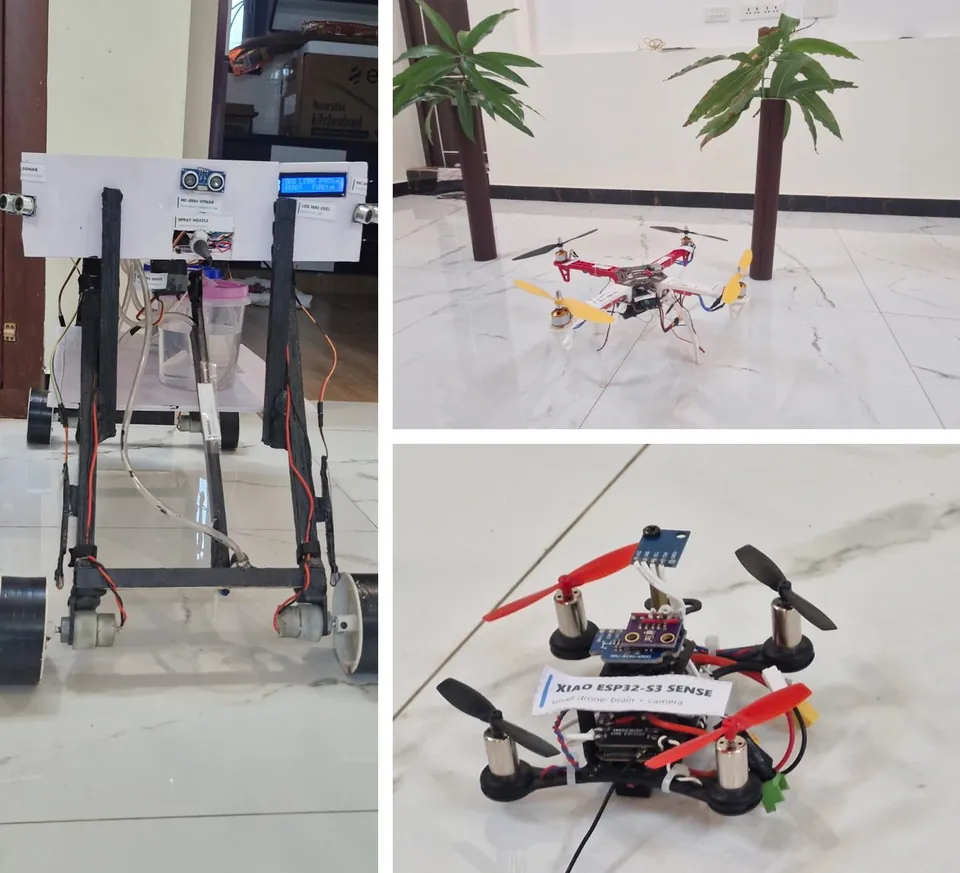
| Eyes | a drone (the F450 with its own WiFi camera; the small XIAO drone came first) | flies over the trees and photographs them |
| Brain | an AI ground station on a laptop | tells a sick leaf from a healthy one, and works out which tree it is |
| Hands | a treatment rover | drives to that tree, softens the soil, lowers a needle and doses the roots |
Watch: a 3-minute explainer video narrated by me, the rover driving between my model trees, and the F450's first flight - all play on the web version of this portfolio.
Finding the tree without GPS. GPS can be a few metres off - in an orchard, that's the next tree. So the drone flies high once and makes its own map, numbering every tree by row. A photo of a sick tree is then matched to the map by the pattern of trees and gaps around it, the way a satellite's star tracker recognises the sky: "row 4, tree 5" (90-100 % the right tree in simulation). The rover drives down row 4 counting trunks with its ultrasonic sonar, holding its line with a compass and a gyro that correct each other (sensor fusion), and stops at tree 5.
How the AI was made - I trained my own first
- First model (June 2026): trained on a home PC with no graphics card, through Google Colab - two days per run. It called every leaf "diseased".
- Checking the data (Aug 2026): I checked six public mango-leaf datasets and found that most were copies of one Bangladesh collection under new names - one was byte-for-byte the same file. Testing on a copy would have given a fake score, so I kept four truly independent collections: 12,724 photos.
- My own trained model (Aug 2026): an EfficientNet-B0 network with two outputs - "is it diseased?" and "which disease?" - built over three days of work on my new laptop's graphics card, and tested the strict way: trained on three collections, tested on the fourth it had never seen. It missed only 1.8-4.8 % of diseased leaves, and still caught 98 % of diseases that weren't in its training at all.
- The test that broke it: on real photos of trees it called all 10 diseased - even healthy ones. The reason: every public photo was a single picked leaf lying on white paper, so it had never seen a tree. When I added 162 healthy garden photos, it learned a shortcut instead - "messy background = healthy" - and missed 86 % of disease.
- The fix: a pretrained vision model, which has seen hundreds of millions of everyday photos, so a garden is normal to it. I first trained a small classifier layer of my own on top of CLIP, using my 12,724 photos, then tested bigger models in 11 tough conditions on real photos. After testing about ten models on leaves from my own garden, I chose SigLIP (a vision transformer from Google), scoring the whole picture with a threshold of 0.40.
- Real sick leaves: I found powdery mildew on our mango tree (confirmed by the thumb test - it rubs off like dust) and photographed 44 leaves: 89 % right. Then through the drone's own camera: 8 of 9.
What the custom training taught me is in the final design: test on photos the AI has never seen, check datasets for copies, report missed diseases and false alarms separately (a missed disease costs a tree, a false alarm costs one check), and never add data to only one side of a label.
Results - my own tests:
| Test | Result |
|---|---|
| Mango leaves from my own garden (44) | 89 % right |
| The drone's own camera over a leaf mat | 8 of 9 leaves right |
| Leaves on living plants, 6 crops (265 photos) | 93 % |
| Apple / banana leaves in the field | 94 % / 92 %, no false alarms |
| Pomegranate fruit on the tree (two sets, 338 photos) | 98 % / 96 % |
| 26 crops, 1,855 photos in all | about 92 % |
| A full treatment (soften, needle, dose, needle up) | about 10 seconds |
Most mistakes are missed diseases, not false alarms. Still weak: citrus (21 %) and sugarcane (69 %), which need their own tuning. Naming the exact disease is not reliable yet, so when it isn't sure the AI says "unidentified - inspect" instead of guessing.
Built with:
| Part | Hardware |
|---|---|
| F450 drone | Radiolink F722 flight controller (Betaflight), 4 x A2212 brushless motors, FlySky FS-i6 radio, an AI-Thinker ESP32-CAM camera (800 x 600, about 21 fps over its own WiFi) |
| XIAO drone | XIAO ESP32-S3 Sense running my own flight software, 69 g - the first drone |
| AI ground station | laptop, Python, SigLIP; works offline; a phone can send photos too |
| Rover | ESP32-WROVER, PCA9685, 2 x L298N, 4 wheels with hall encoders, 3 pumps on relays, 2 servos (needle arm, spray nozzle), 4 ultrasonic sonars, MPU6050 gyro + QMC5883P compass, DHT11, LCD, two fused 3S Li-ion packs |
Safe by design: STOP always works, a lost link stops a treatment within 1.5 s and lifts the needle, it won't start on a low battery, and its sonars stop it before obstacles.
Why the roots: research for the project found that trunk injection is already proven in mango - it cut sudden-death disease and malformation in published trials - so treating one tree at the roots or trunk is a real method, not just an idea.
The journey:
| When (2026) | |
|---|---|
| June | first plan: a near-infrared camera; first AI; the DM002HW drone that wouldn't share its data |
| 1 Aug | my first drone flight software - the XIAO drone |
| 20-21 Aug | my own disease model trained and tested - then broken by real tree photos |
| 2 Sep | switched to a pretrained vision model - zero missed and zero false alarms across 11 tough conditions |
| 8 Sep | drone + AI working together |
| 28 Sep | the rover drives, sprays and injects from a phone |
| 1 Oct | SigLIP chosen; 89 % on real sick leaves from my garden |
| 9 Oct | first test through the drone's camera: 8 of 9 |
| 10 Oct | INNOCHAMP Season 2, round 1 - the judging was rushed and the drone's WiFi failed in the crowded hall |
| 16 Oct | selected for the state Grand Finale |
| 20-24 Oct | the F450 built from parts and flown in a week - through a burned power-board trace, a dead 5 V supply and a reversed motor |
| 31 Oct | Grand Finale, Chennai Trade Centre: a 3-minute pitch and 2 minutes of questions. The hall WiFi failed for every team, so the rover never connected and the judges skipped it - the AI and my pitch had to carry it |
| 1 Nov | Winner - 1st place, Young Explorers (Grade 6-8): 1st of 137 teams in the finale (about 700 in the zonal prelims), with a trophy, a certificate and a ₹25,000 prize |
My school honoured me in front of the whole school, presenting the round 1 certificate of participation and the INNOCHAMP Proud Participant memento. My school's other team won 2nd place in Category 2, so both our school's teams came home with prizes.
337+ saved versions over 37+ working days; every version is kept (v1 to v8).
What it taught me: test an AI on your own real photos, not only on its dataset; show the demo in the first 20 seconds; lead with what you measured yourself; and never let a demo depend on the venue's network - since the finale the rover also runs over a USB cable, and the phone can join by cable or Bluetooth.
Who did what: the idea, the system design, the hardware and every test are mine. My best friend helped a lot with the building - gluing and assembling - and a classmate organised the wiring of the first rover (the same classmate whose robot I had wired a year earlier). The code was written with an AI coding assistant that I directed and tested.
Neural networks that run inside Scratch
Side quest
A fun side quest.
How it started: I saw someone build a whole neural network inside Scratch - trained in Python, then rebuilt in blocks so Scratch itself does the maths - that could tell a picture of a 0 from a 1. I wanted to do it too, and then go further: make my AI know a human.
Read the full story
What I built (all of it runs as ordinary Scratch blocks; the scores below come from the automatic checks when each project was built - I haven't tested it much myself yet):
| Scratch project | What it does | Result |
|---|---|---|
| Digit reader | a 0-or-1 network trained in Python, run in Scratch (826 numbers, 100 inputs) | 99.95 % on 2,115 test digits; 13 ms per answer |
| A network that trains itself in Scratch | starts from random numbers and learns in blocks - forward pass, loss, backward pass, all of it | 100 % on 200 test digits in 5 of 6 runs (99.5 % in the other); trains in about 9 seconds |
| Person detector | looks at a window of a street photo and says whether a person is in it; Scratch also does the image preparation (shrinking, edges, standardising) | 91 % on street photos it never saw (97 % of people found), 1,050 numbers |
| Watching it think | every neuron drawn on screen, glowing green as hard as it fires | see which neurons light up for a person and for a wall |
| Discs and wires | the textbook diagram, live - every neuron a disc, all 1,040 connections drawn | |
| A camera app in pure Scratch | live preview and a shutter button | Scratch can only sense motion, not colour, so a picture comes out as a moving outline |
What I learned:
- The first person detector scored only 55-68 % (a coin flip is 50 %) while scoring 100 % on its training photos - it had memorised them. More examples (each person re-cut at different sizes) and edges instead of brightness (a body is a shape, not a colour) took it to 91 %.
- A smaller network beat a 30-times-bigger one on new photos - bigger isn't better when data is small.
- Not every neuron learns something a human can read: some look like a body shape, others like noise.
How it was made: the idea, what to build and how it should look are mine; the code that builds the Scratch projects was written with an AI coding assistant that I directed and tested.
Next: I'll show it at my school expo, alongside Wise Agri Growth - a neural network you can watch thinking, in a program every student already knows.
A 4-bit computer - designed, not built
Designed, not built
Why: after the first INNOCHAMP round I wanted to understand how a computer actually works inside, so I started designing my own, in the circuit simulator Logisim Evolution.
Read the full story
What I did:
- Built and tested a half adder from an XOR and an AND gate - the circuit that adds two bits (1 + 1 = "write 0, carry 1"), and the first brick of a computer's adder.
- Designed the whole computer (14 Oct 2026), "Simple As Possible" style: a clock with a step button, a program counter, 16 memory slots holding the program and the numbers, registers A and B, an adder/subtractor with carry and zero flags, a control unit, and an output shown on 4 LEDs and then a 7-segment digit.
- Its own instruction set - 11 instructions, each 8 bits (4 bits say what to do, 4 bits say where): load, add, subtract, store, load a number, jump, jump if carry, jump if zero, output, stop. The "if" jumps let it make decisions and loop.
- First program to run: multiply 3 x 4 by adding 3 four times - it should show 12 ("C").
Why it stopped at the design: the parts weren't in the budget, and building it would have taken more than a month - while I was preparing Wise Agri Growth for the state finale and studying for exams. So I put my time into the Scratch neural networks instead (project 8), which I can show at the school expo. The design is ready if I come back to it.